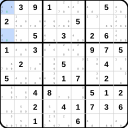
Locked Candidates
المستوى 3 · Yellow Belt
المتطلب السابق: Locked Candidates
Overview
Locked Candidates occurs when candidates in a block are restricted to a single row or column. This allows elimination of that candidate from the rest of that row or column outside the block.
How It Works
- Type 1 (Pointing): When a candidate in a block exists only in one row/column, eliminate it from that row/column outside the block.
- Type 2 (Claiming): When a candidate in a row/column exists only within one block, eliminate it from other cells in that block.
Example
Check digit 2 in row 3.
1 / 11
Tips & Patterns
- Scan each block looking for candidates aligned in a single row or column.
- This technique is very common and should be checked regularly.
- Locked Candidates often unlock more complex patterns.