Empty Rectangle
Level 5 · Orange Belt
Prerequisite: Single-Digit PatternsLearn next → Locked Candidates
Overview
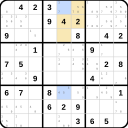
Empty Rectangle uses the absence of a candidate in a rectangular area within a box. When four cells form an empty rectangle for a candidate, combined with a strong link, eliminations become possible.
How It Works
- Find a box where a candidate forms an "L" shape (all instances in one row and one column of the box).
- The remaining 4 cells form an empty rectangle for that candidate.
- Find a strong link outside the box that shares a line with the non-empty row/column.
- Eliminate from the intersection of the other strong link cell's line and the box's non-empty column/row.
Example
Check digit 9 in box 7. All candidates form an 'L' or 'T' shape.
1 / 5
Tips & Patterns
- Empty Rectangles are easier to find when you look for the "L" pattern first.
- The technique exploits that the candidate must be in one of the L's arms.
- Practice identifying Empty Rectangle Intersections (ERIs).